Elevate the shopping experience with Search and Discovery capabilities
It wasn’t that long ago that ordering parts meant leafing through an 800‑page catalogue and hoping the phone rep could decode your description. Buyers now expect answers in seconds, not hours, and the brands that deliver win the re‑order. That’s why Search & Discovery sits at the heart of Sana Commerce Cloud (SCC).
Our latest release simplifies two common buyer pain points:
- Finding the right information (blogs, FAQs, manuals).
- Pin‑pointing the exact SKU in a sea of near‑identical options.
Below, we walk through the three newest features that solve both.
Content Search — the knowledge base in your search bar
Content Search — the knowledge base in your search bar

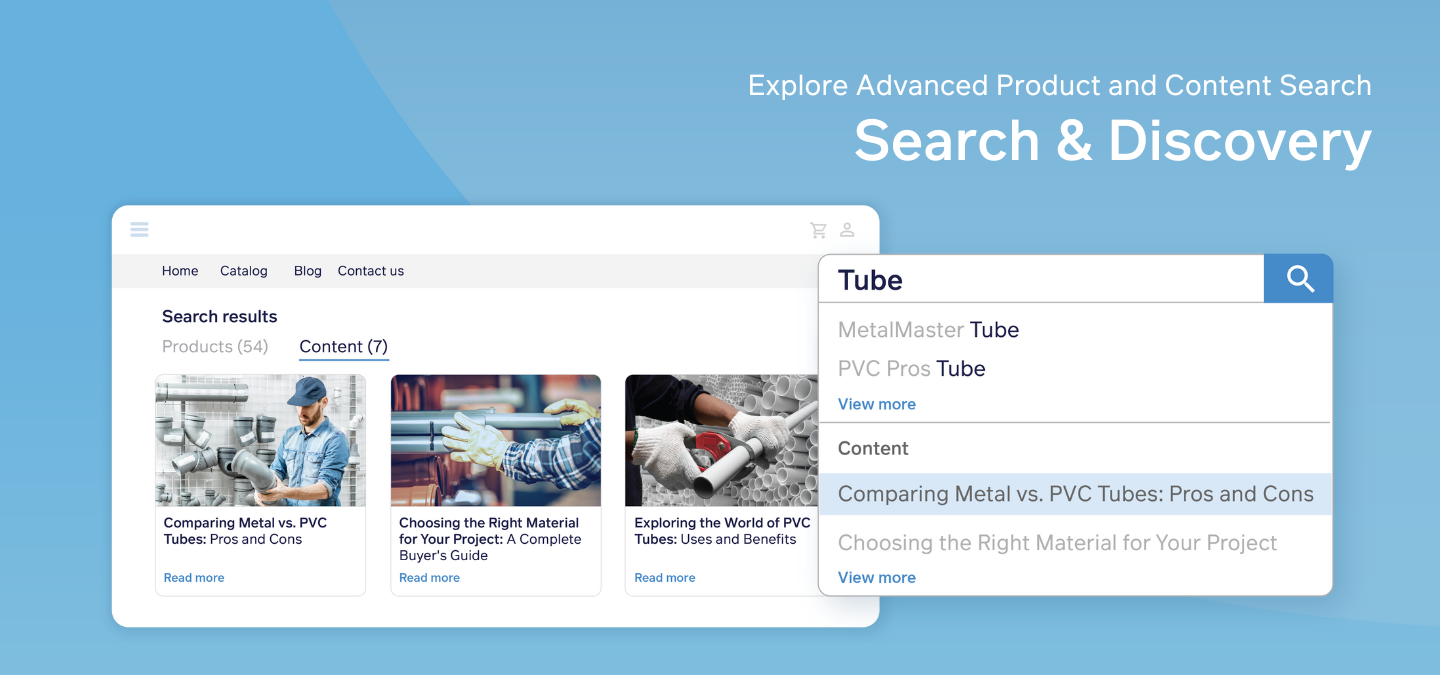
Surfaces content pages, blog posts, FAQs and news items directly in autocomplete.

Buyers can toggle between Product and Content results on the same results page.

Fully designable in Visual Designer — choose grid vs. list, results per page and paging style.
Why it matters
- Procurement teams find safety sheets, installation guides and policy pages without calling support.
- Rich content keeps buyers on‑site longer, boosting engagement and thought‑leadership cred.
Real‑world snapshot: A purchasing manager needs a pressure‑valve maintenance video. She types “valve upkeep” and the video article appears before she even hits Enter.
Facet Filter & Preselection — relevance on the first try
Facet Filter & Preselection — relevance on the first try
Lets buyers include attribute words (e.g., “13‑inch black”) straight in the search bar.

Sana Commerce Cloud auto‑applies those attributes as facet filters, so the results list is pre‑trimmed.
Why it matters
- Eliminates filter‑maze fatigue and reduces bounce.
- Speeds up decision‑making for buyers who only know a handful of specs.
Real‑world snapshot: Searching "screen black 13 inch" returns 13‑inch black displays — not everything with “black” in the description.
Product Specifications in Search Bar
Product Specifications in Search Bar

Autocomplete now shows brand, manufacturer part‑numbers and dimensions under each product hit.

Admins pick which specs appear via Setup → Products → Product specifications — no extra license fee.
Why it matters
- Buyers recognize the right SKU instantly, slashing mis‑orders and return costs.
- Perfect for industries with dense variant grids: automotive, industrial machinery, electronics, metalworks.
Real‑world snapshot: A spare‑parts clerk sees “SKF | 6205‑2RS | 25 × 52 × 15 mm” in the dropdown and orders with confidence — no PDF catalogue required.
Additional Search and Discovery functionalities:
Additional Search and Discovery functionalities:
Sana Commerce Cloud offers several additional features at no extra cost, enhancing the search and discovery experience:
Extend the findability of your products by tagging similar words or creating semantics in the backend.
Showcase your top searches or best-selling products by creating product-specific web store pages instead of showing search results with a list of pages.
Prioritize and boost specific keywords tailored to your buyers.
Help buyers find directly what they’re looking for through the search results without the need to type the whole word, Product ID, or blog title.
Search for a part of the word or a phrase based on core terms.
Give buyers with language barriers the flexibility to still find what they need by allowing them to search products by their pronunciation.
Save buyers time when you narrow or broaden search terms by using AND or OR when searching for products.
Get started in three steps
- Toggle on the features you need in Sana Admin → Setup → Search & Filters.
- Design the look in Design & Layout → Content search results (for Content Search) or pick specs (for Product Specifications in Search Bar).
- Publish and measure — watch conversion and bounce metrics shift in days
Experience the difference
In conclusion, with Sana Commerce Cloud’s search and discovery features, we heavily reduce scrolling and frustration for B2B buyers. Empower your customers with a seamless, efficient shopping experience that keeps them coming back.
With Sana Commerce Cloud’s advanced search and discovery features, we minimize the effort and frustration often associated with online shopping. Empower your customers with a seamless, efficient shopping experience that keeps them coming back for more.